Managing your hotel on multiple OTAs sounds great until bookings start coming in from different platforms at the same time. One room gets booked on Goibibo while it’s still showing as available on MakeMyTrip. That’s how overbookings happen.
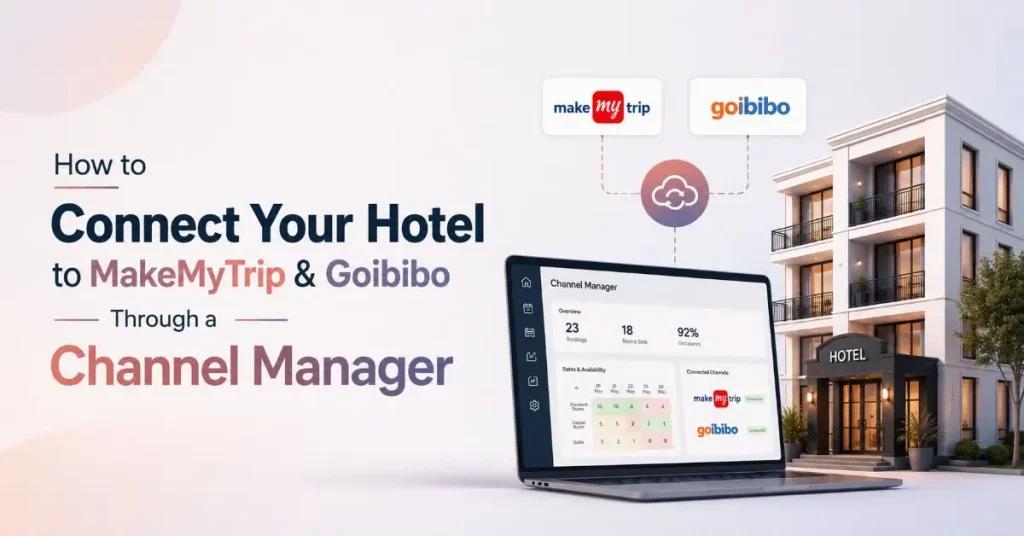
The easiest way to avoid this is through channel manager integration. Instead of updating every OTA manually, you manage everything from one place, and the system automatically syncs your inventory, pricing, and reservations.
In this guide, you’ll learn exactly how to connect your hotel to MakeMyTrip and Goibibo, why hotels rely on channel managers, the benefits they offer, and the mistakes you should avoid during setup.
How to Connect Your Hotel to MakeMyTrip and Goibibo Through a Channel Manager
Connecting your hotel is usually a one-time setup. Once everything is configured properly, room availability, prices, and reservations update automatically across both OTAs.
Here’s how the process works.
1. Choose a Hotel PMS That Supports Channel Manager Integration
Many modern hotel management systems either include a built-in channel manager or integrate with third-party providers.
Before choosing a PMS, check whether it supports:
- MakeMyTrip
- Goibibo
- Booking.com
- Agoda
- Expedia
- Airbnb
The more OTA integrations available, the easier it becomes to expand your online presence later.
2. Register Your Hotel on MakeMyTrip and Goibibo
If your property isn’t already listed, complete the onboarding process on both platforms.
Your hotel profile should include:
- Room types
- Amenities
- Photos
- Pricing
- Policies
- Bank and tax details
Both OTAs need approved hotel listings before integration can begin.
3. Connect the OTAs to Your Channel Manager
Once your hotel accounts are active, connect them to your channel manager using API credentials or the integration process provided by your software.
During this step, the system establishes a secure connection between:
- Your PMS
- The channel manager
- MakeMyTrip
- Goibibo
This allows reservation and inventory data to move automatically between all systems.
4. Map Your Room Types Correctly
Room mapping is one of the most important parts of the setup.
For example, if your PMS has a room called “Deluxe King Room,” it should be mapped to the same room listed on MakeMyTrip and Goibibo.
Incorrect mapping can cause:
- Wrong room assignments
- Pricing mismatches
- Inventory errors
- Reservation issues
Take your time during this step.
5. Test the Integration Before Going Live
Never skip testing.
Create a sample booking and verify that:
- Inventory updates correctly
- Prices sync properly
- Reservations appear inside your PMS
- Cancellation updates work
- Room availability changes instantly
A successful test confirms your MakeMyTrip channel manager integration is working as expected.
6. Start Managing Everything From One Dashboard
Once testing is complete, your hotel is ready.
Now whenever:
- a room is booked,
- a reservation is cancelled,
- prices change,
- inventory changes,
your Goibibo channel manager automatically updates every connected OTA in real time.
No more logging into multiple extranets.
No more manual updates.
Also Read: How to Reduce Cancellations and No-Shows at Your Hotel?
Why Hotels Should Use Channel Manager Integration
Managing two OTAs manually might seem manageable at first.
But as bookings increase, things quickly become difficult.
Hotel teams spend hours updating room availability across different platforms. Even one missed update can lead to overbookings, unhappy guests, refund requests, and poor reviews.
That’s why channel manager integration has become an essential part of hotel operations.
Instead of making the same update multiple times, hotels update information once inside their PMS, and every connected OTA receives the changes automatically.
This saves time while reducing costly mistakes.
Benefits of Connecting MakeMyTrip and Goibibo
Connecting your hotel through a channel manager offers much more than convenience.
Some of the biggest benefits include:
- Real-time inventory synchronization
- Automatic room rate updates
- Fewer overbookings
- Centralized reservation management
- Better occupancy control
- Faster OTA management
- Less manual work
- Improved operational efficiency
For hotels managing multiple booking channels, this automation can save several hours every week.
Most integration problems don’t happen because of the software.
They usually happen during setup.
Some common mistakes include:
- Mapping the wrong room categories
- Forgetting to test reservations before going live
- Updating room rates manually after automation is active
- Using inconsistent room names across OTAs
- Choosing software that supports only a few booking channels
Avoiding these mistakes helps ensure a smooth integration from day one.
Is Channel Manager Integration Worth It?
If your hotel is listed on MakeMyTrip, Goibibo, or any other OTA, the answer is yes.
Manual inventory updates become difficult as bookings grow.
With OTA channel manager India integration, hotels can automate repetitive work, reduce errors, improve occupancy management, and keep every booking platform updated in real time.
Whether you run a boutique hotel, resort, homestay, or hotel chain, automation allows your team to spend less time managing OTAs and more time delivering a great guest experience.
Final Thoughts
Online bookings continue to grow every year, and managing multiple OTAs manually is no longer practical.
By implementing channel manager integration, hotels can connect MakeMyTrip, Goibibo, and other booking platforms through one centralized dashboard. Inventory stays accurate, pricing remains consistent, and reservations sync automatically across every channel.
If your hotel wants to reduce overbookings, save time, and maximize online revenue, investing in MakeMyTrip channel manager integration and a reliable Goibibo channel manager is one of the smartest operational decisions you can make.
FAQs
1. What is channel manager integration in hotels?
Channel manager integration is a system that connects your hotel’s Property Management System (PMS) with online travel agencies (OTAs) like MakeMyTrip, Goibibo, Booking.com, and Agoda. It automatically syncs room availability, rates, and reservations across all connected channels in real time.
2. How do I connect my hotel to MakeMyTrip and Goibibo?
To connect your hotel, choose a PMS or channel manager that supports MakeMyTrip channel manager integration and Goibibo channel manager. Register your hotel on both OTAs, connect them through API integration, map your room types, test the setup, and then go live.
3. Why should hotels use a channel manager instead of updating OTAs manually?
Managing multiple OTAs manually can lead to overbookings, pricing errors, and inventory mismatches. With channel manager integration, all updates are synchronized automatically, saving time, reducing manual work, and improving booking accuracy.
4. Can a channel manager connect my hotel to multiple OTAs at the same time?
Yes. Most modern channel managers support OTA channel manager India integration, allowing hotels to connect with multiple booking platforms such as MakeMyTrip, Goibibo, Booking.com, Agoda, Expedia, and Airbnb from a single dashboard.
5. Does channel manager integration help increase hotel bookings?
Yes. By keeping room availability and pricing updated across all OTAs in real time, channel manager integration reduces missed booking opportunities, prevents overbookings, and helps hotels maximize occupancy and revenue.